
'%3e%3cpath%20d='m222.077%2039.192-8.019%20125.923-76.671-165.115zm-53.105%20162.825-57.933%2033.056-57.934-33.056%2011.783-28.556h92.301zm-57.933-139.342%2030.357%2073.803h-60.715zm-103.102%20102.44-7.937-125.923%2084.69-39.192z'%20fill='url(%23a)'/%3e%3cpath%20d='m222.077%2039.192-8.019%20125.923-76.671-165.115zm-53.105%20162.825-57.933%2033.056-57.934-33.056%2011.783-28.556h92.301zm-57.933-139.342%2030.357%2073.803h-60.715zm-103.102%20102.44-7.937-125.923%2084.69-39.192z'%20fill='url(%23b)'/%3e%3c/g%3e%3c/svg%3e)
Enforcing Code Coverage in Angular CLI Projects
In this short post, we will cover unit testing code coverage. Unit testing is an important aspect of large-scale Angular applications. With the
Angular CLI its easy to test, run coverage reports and enforces a minimum coverage for the project.
To run our unit tests and generate our report run the following code:
ng test --watch=false --code-coverageOnce ran the unit tests will run a single time reporting any issues. If all tests pass, we will see a new /coverage folder generated. In the coverage folder, we can simply double click the index.html file in our finder/file explorer and view the report in the browser. You should see something similar to the following:
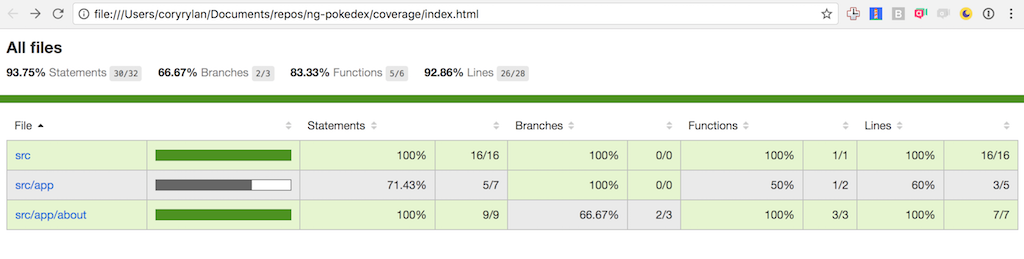
So now that we have unit tests and code coverage, we can enforce an absolute minimum to be tested. This minimum is up to your team to decide, but I usually try to make a goal of 80% or more.
To enforce this as a build error if our coverage drops below 80% we need to edit our karma.conf.js file. In this file under the coverageIstanbulReporter key we add the following:
coverageIstanbulReporter: {
  reports: [ 'html', 'lcovonly' ],
  fixWebpackSourcePaths: true,
  thresholds: {
    statements: 80,
    lines: 80,
    branches: 80,
    functions: 80
  }
},
Under thresholds we can tell Karma our test runner to have certain minimum thresholds for our code coverage. If our code coverage drops below these percentages, Karma will throw an error and fail the build. With the Angular CLI, we can get fantastic tooling for our client-side applications.


%20--%3e)
%20--%3e)